Product
How Yakini checks what’s done.
Yakini audits each work item declared done, criterion by criterion. It gathers evidence the way a careful reviewer would, then deterministic checks, not a model’s say-so, decide what can be published.
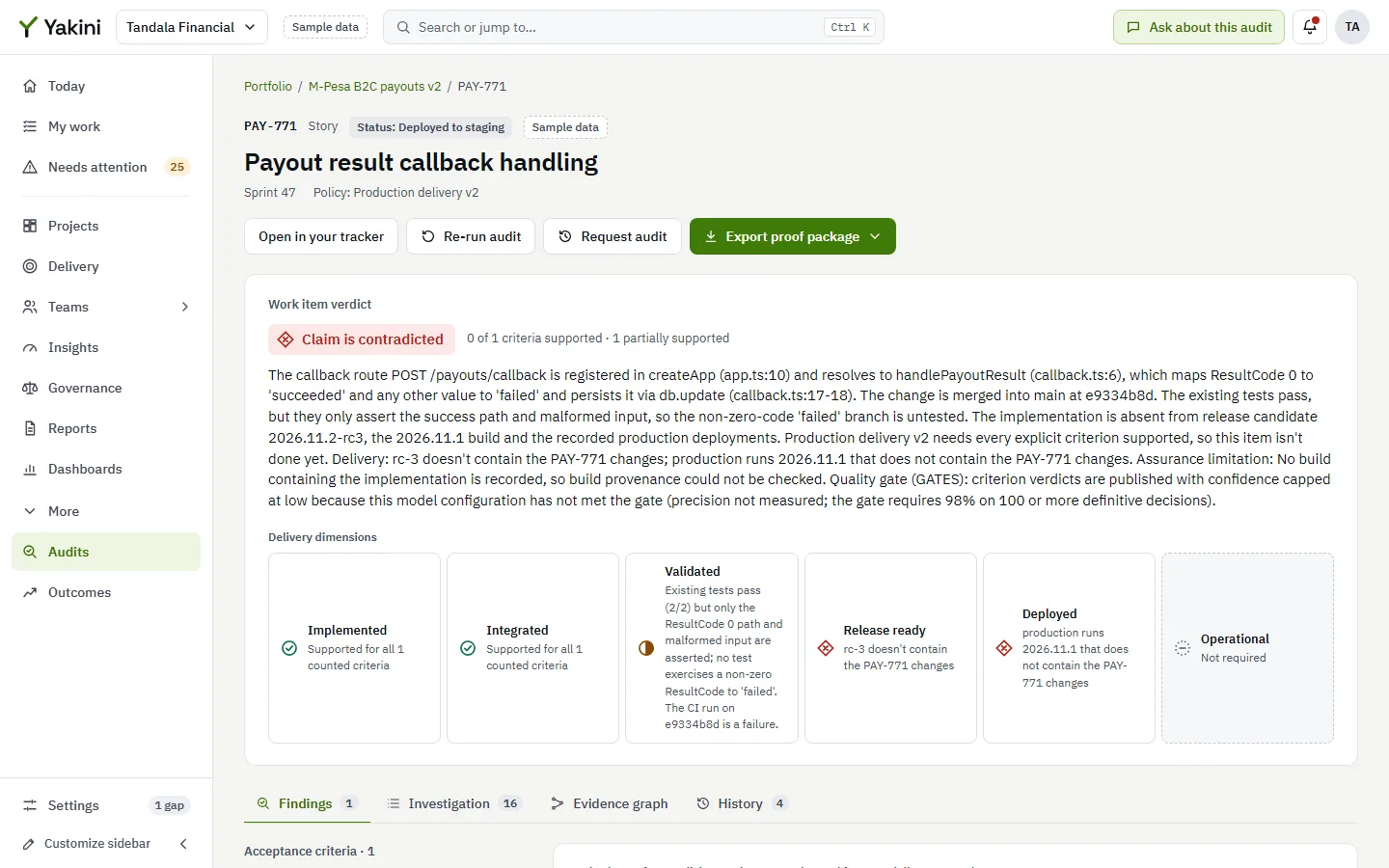
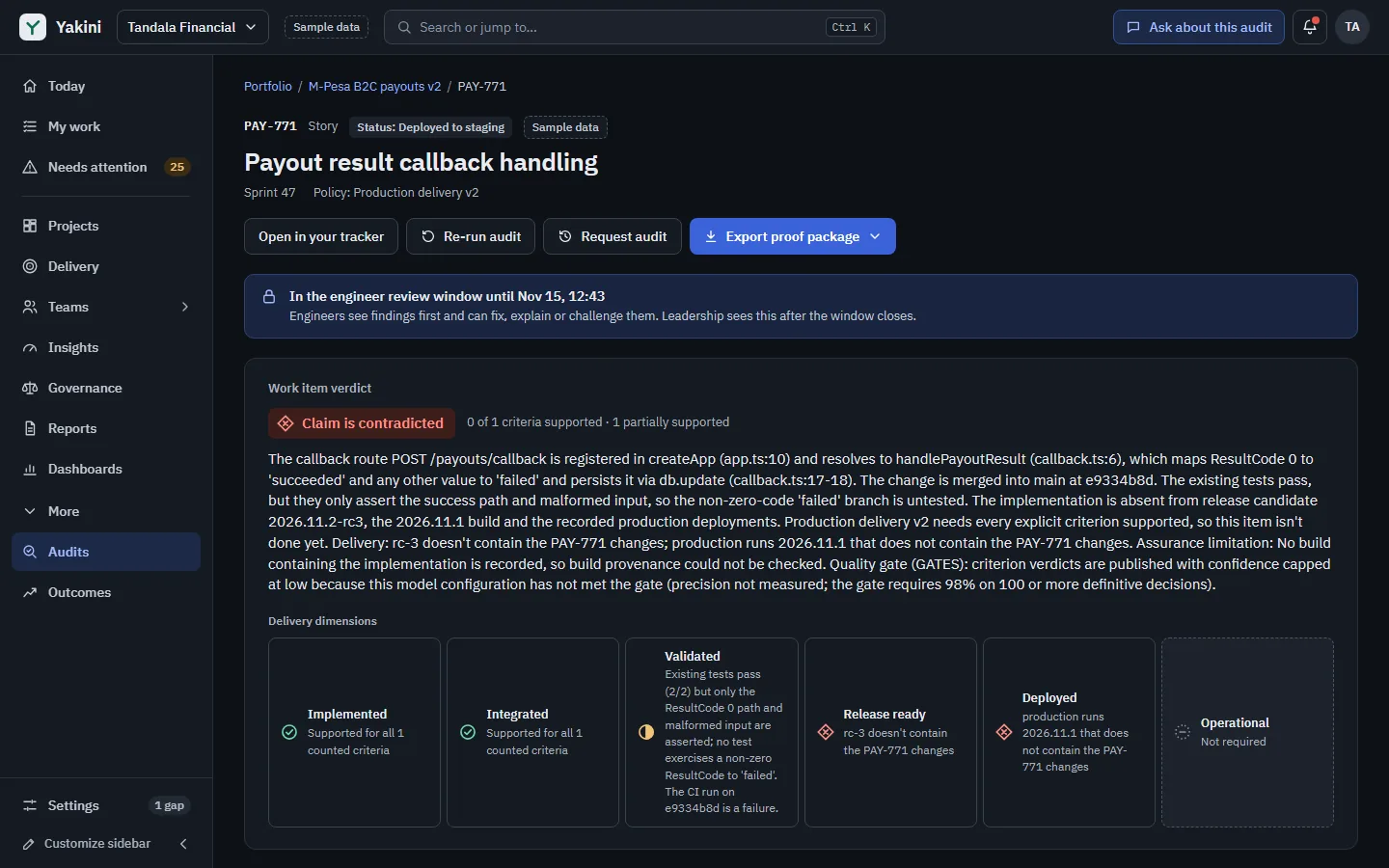
The audit
Five stages between a status change and a verdict.
Every stage is recorded as it happens: the plan, each step and tool call, the citations, traces and tests. Auditors can follow all of it in the audit workspace.
Step 01
Claim
A tracker sync or webhook records a change; Yakini extracts the claim and splits the acceptance criteria.
Step 02
Trigger
A move to Done, or another trigger you configure, queues an audit with your policy, scope and budget.
Step 03
Investigate
The auditor reads the code at the shipped commit, runs tests in the lab and checks the delivery record.
Step 04
Assure
Citations and traces are validated, your policy is applied and every contradiction is challenged.
Step 05
Publish
Once published, after approval by default, the engineer sees the findings first and a signed proof package is built.
The auditor
It reads the code that actually shipped.
For each acceptance criterion, the auditor investigates the code at the exact commit that shipped, not the latest branch. It traces the execution path from an entry point, such as an API route or a scheduled job, to the behaviour the criterion describes, and checks the delivery record: pull requests, CI runs, builds, release candidates, deployments and feature flags.
- Code read at the audited commit, with every citation pinned to it
- Execution paths traced from an entry point to the behaviour
- Delivery checked for the audience a claim is about: built, deployed and switched on for those users
- Read-only tools under hard budgets for tool calls, tokens, time and cost: it can’t change any of your systems
The verification lab
It runs the tests, and tests the tests.
Existing and generated tests run in isolation, on a copy of the source and without network access. Passing isn’t enough: a test counts as evidence of behaviour only when it fails against a deliberately broken copy of the code it claims to test.
- Existing and generated tests, run in isolation
- Negative controls: a test must catch a broken copy of the function it tests
- Regression tests for bug fixes must fail before the fix and pass after it
- Tests that assert nothing, or catch nothing, are recorded as such and don’t count
Deterministic assurance
Rules, not a model, decide what is published.
A verdict is never taken from a model directly. A deterministic assurance layer checks every citation against the source at the audited commit and every trace against the code graph, applies your completion policy mechanically, and works out confidence from the quality of the evidence, never from the model’s own assessment.
- Invalid citations and unvalidated traces can’t support a verdict
- Your completion policies, applied the same way every time
- Confidence from validated citations, executed tests and the challenge outcome
- Every adjustment recorded with the rule that made it, and shown on the finding
The independent challenger
Every contradiction has to survive a challenge.
Before a Contradicted verdict is published, an independent challenger, working in a separate context and on a different model when one is configured, tries to refute it. A sample of Supported verdicts is challenged too. If the challenge can’t complete, or the two can’t be reconciled, the finding is published as Unverified rather than as a guess.
- A separate context whose only job is to refute the finding
- A sample of Supported verdicts challenged as well
- Unresolved disagreement ends as Unverified, with the reason
Approval, review window and challenges
People stay in charge of what is said about their work.
Definitive verdicts can be held for a person’s approval before they’re published, and today that’s the default. Once published, a finding goes to the engineer first: it stays private to them during a review window, while they add context or challenge it. Challenges are reinvestigated with the evidence they point to.
- Definitive verdicts held for human approval by default
- Findings private to the assignee during the review window
- Challenges reinvestigated with the evidence they cite
- Nobody approves findings about their own work
Signed proof packages
Proof that anyone can check.
Each audit produces a proof package with the verdicts, the evidence they rest on and how they were reached, as PDF and as JSON. It is signed with Ed25519, so anyone can verify that nothing in it has changed. People without access to restricted source code receive it with the code excerpts taken out, signed again.
- Verdicts, evidence and method in one document
- PDF for people, JSON for systems
- Signed, so any change shows
- Code excerpts left out for readers without source access
Beyond verdicts
Engineering management on verified delivery.
The same evidence drives the tools that leaders, product people and engineers use every week, and every figure can be followed down to the items behind it. None of them ranks or scores individuals.
Delivery confidence
- Delivery confidence for every commitment
- Early-warning radar: Needs attention
- Sprint commitment check and verified burn-up
- Scope-change log and commitment tracker
- Scenario planning
- Cross-team dependency map
Flow and quality
- Flow metrics
- DORA and pipeline metrics
- Quality debt register
- Review and CI bottlenecks
- Investment mix
Teams
- Team health radar
- Team pulse and evidence-backed retros
- Capacity and availability calendar
- My load and blockers, shown to the person it’s about
- Celebrating verified outcomes
Product and requirements
- Definition of Ready: a quality check of acceptance criteria
- PM home and roadmap
- Stakeholder updates and release notes
- Customer commitments and outcomes
Leadership and governance
- A home for each role: Today
- Weekly briefings and meeting packs
- Executive scorecard
- Risk and decision log, compliance packs
- Vendor and contractor delivery acceptance
Fits your organization
- Operating-model setup with presets
- Rules and automation builder
- Settings that inherit, with overrides
- Metric and signal catalogue
- Privacy profiles and notification control
- Your fields, taxonomy, terminology and roles
- Configurable dashboards and saved views
- Configuration as code
Sample dataThe panels show sample commitments, figures and settings.
Where people work
Yakini in the tools people already have open.
Verdicts and next steps come to Slack, Microsoft Teams, Jira, VS Code and pull requests. Actions taken there run with the person’s own permissions in Yakini.
Slack
Notifications in your channels, with buttons to snooze, approve or open them in Yakini once an administrator turns that on.
Microsoft Teams
Notifications in your channels; once an administrator turns it on, people act on them by replying.
Jira issue panel
Each issue shows its verdict, its criteria, what evidence is missing and the next step. Settled findings only, never code.
VS Code
The work item for your branch with its latest verdict and Path to Supported, and private self-checks before you declare done.
Pull-request checks
A Yakini check on each linked pull request on GitHub, for projects that turn it on.
Sample dataThe panels show sample work items in each tool.
See Yakini with your own questions.
We’ll walk you through Yakini with a sample organization, show the evidence behind each verdict, and answer your questions about deployment, security and models.
- Hosted, dedicated or self-hosted
- Your choice of models, self-hosted too
- Pricing set out in a written proposal